Automation guide
GoHighLevel Workflows: How Automation Works, With Real Examples
By the GHL Deals editorial team · Last updated: October 2026
TL;DR
- Workflows are triggers plus actions: when something happens, HighLevel runs the next steps.
- They text, email, tag, move pipeline stages, wait and branch.
- Recipes get you started in minutes, then you customize and test.
- Workflows are included in every plan; messaging and premium actions can cost extra.
- One supplied campaign shows 147 old leads and 17 booked calls. It is an example, not a promised result.
- See the 147-lead database reactivation example.
Trigger | Action example |
|---|---|
Form submitted | Text the lead in 10 seconds |
Appointment booked | Send confirmation and reminders |
Missed call | Text back automatically |
Email not opened | Resend with new subject |
Opportunity won | Ask for a review |
Illustrative setups, not default behavior or guaranteed timings. Configure triggers, consent, sending windows and channel connections.
What is a workflow in GoHighLevel?
A workflow is an automated sequence that starts when a trigger matches a contact or event. HighLevel then runs the actions you choose, such as sending an email, assigning a tag or moving a deal. You can start from a recipe or build your own sequence.
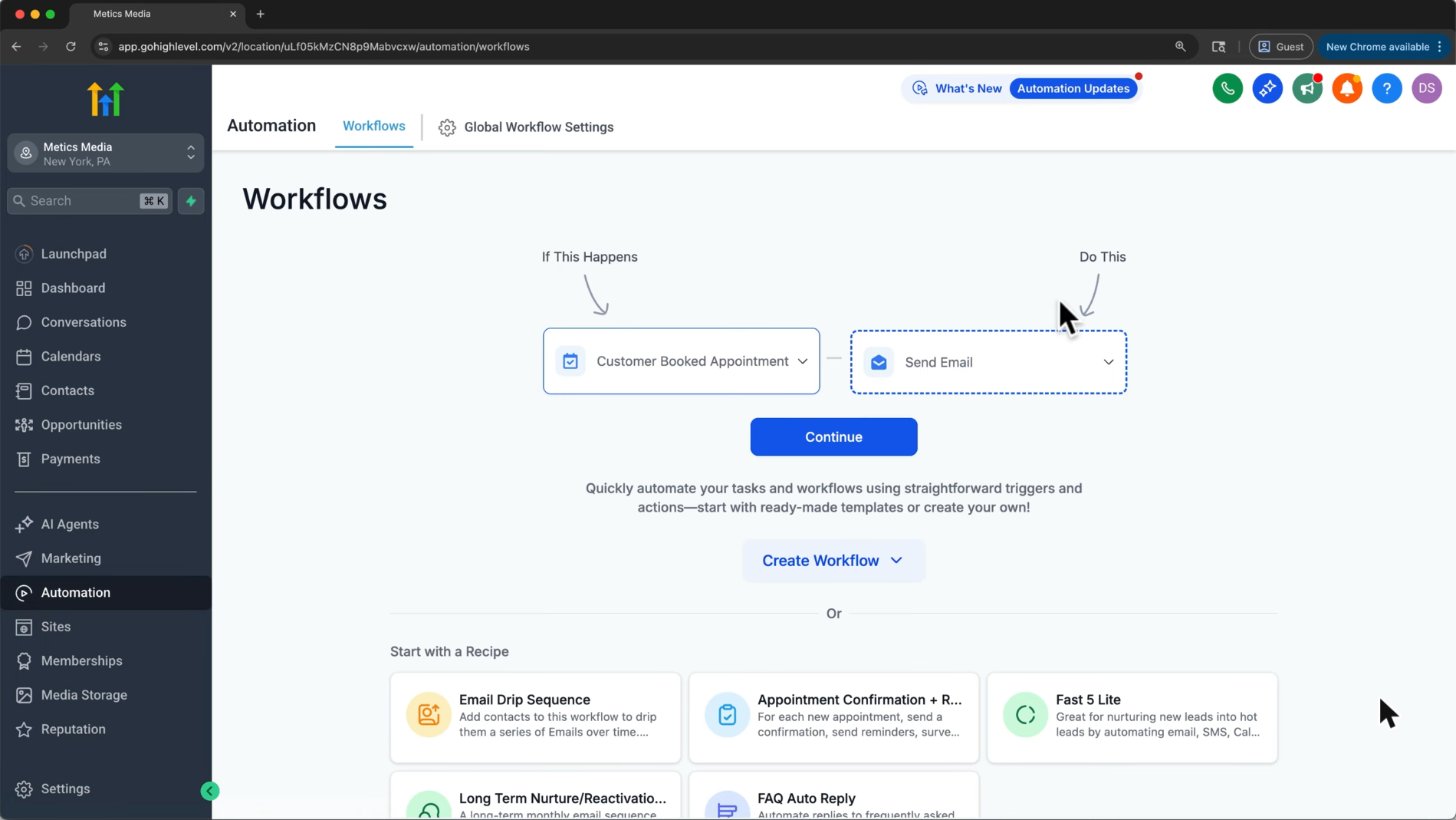
Every workflow is a trigger (Customer Booked Appointment) plus actions (Send Email). Recipes give you ready-made flows.
Screenshot from Metics Media's GoHighLevel tutorial on YouTube.
Triggers, actions, waits and if/else branches
- Trigger: the event that starts the flow, such as a form submission or appointment booking.
- Action: what happens next, such as an SMS, email, tag or pipeline update.
- Wait: a pause for a time period or until a contact replies. Set a timeout so contacts do not wait indefinitely.
- If/else: a decision that sends contacts down different paths based on conditions.
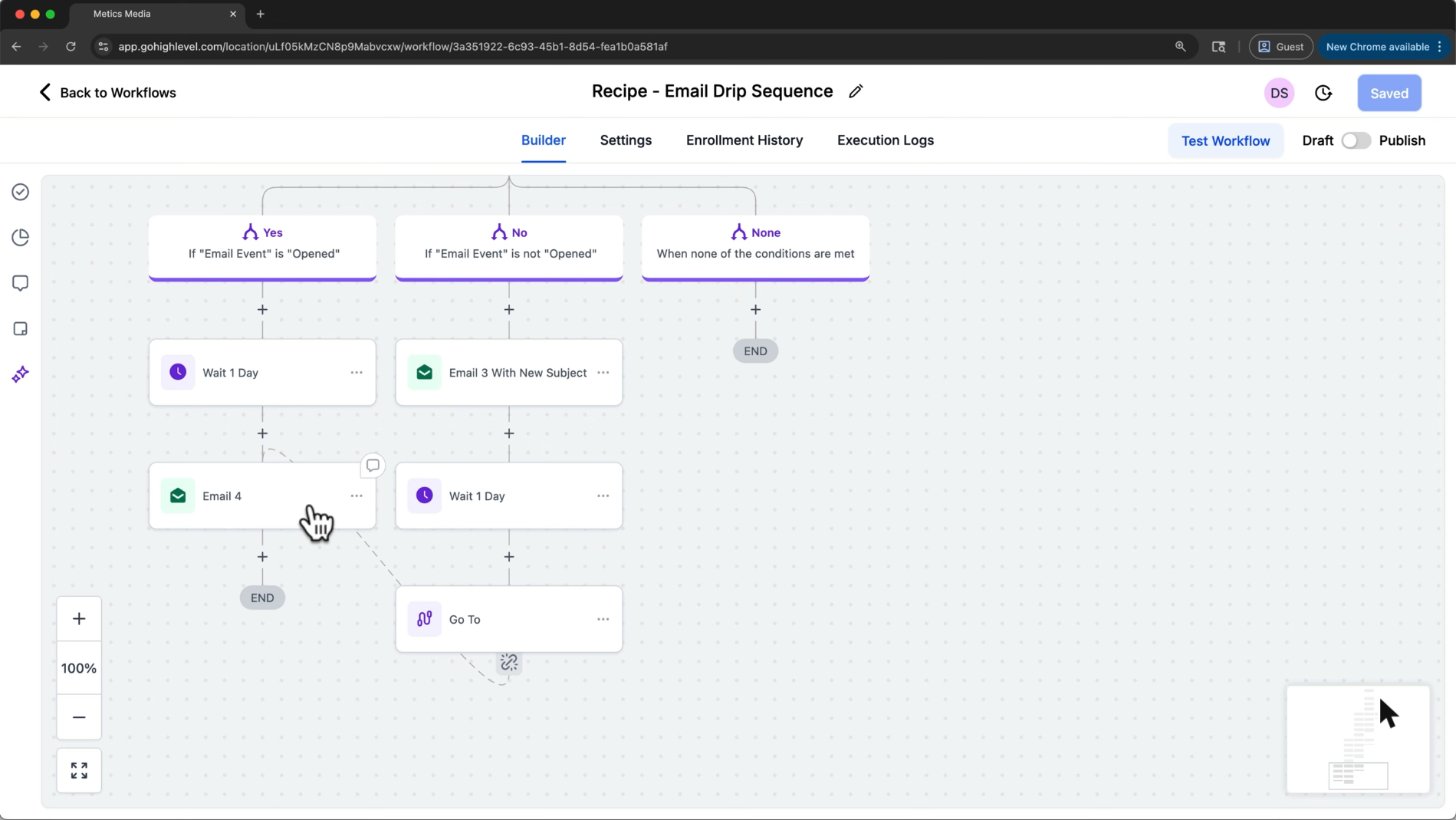
An email drip that splits: if the lead opened the email, wait a day and send Email 4. If not, resend with a new subject.
Screenshot from Metics Media's GoHighLevel tutorial on YouTube.
Email opens are an imperfect signal because privacy features can hide or simulate them. Do not treat an open as proof of purchase intent. Test both branches and avoid repeatedly sending the same message.
5 workflows every business should build
1. Speed to lead
When a consented enquiry arrives, create or update the contact, assign an owner and send a useful acknowledgement. Stop the sequence when someone replies.
2. Appointment reminders
Send a booking confirmation and reminders in the contact's time zone. Handle cancellations and rescheduling so old reminders stop.
3. Missed call text back
Send a short callback message after a missed call, where consent and local rules allow it. Prevent duplicate texts when a caller tries again.
4. Review request
Request an honest review after a completed job. Do not filter requests to only satisfied customers or offer rewards for positive reviews.
5. Database reactivation
Follow up with older, consented leads using a short message and a clear opt-out. Move replies into a pipeline for your team.
Real example: tracking booked calls for ads
This supplied agency screenshot connects Customer Booked Appointment to Meta Conversion API. When the trigger fires, the configured action sends the booked-call event to Meta, giving the ad account another conversion signal.
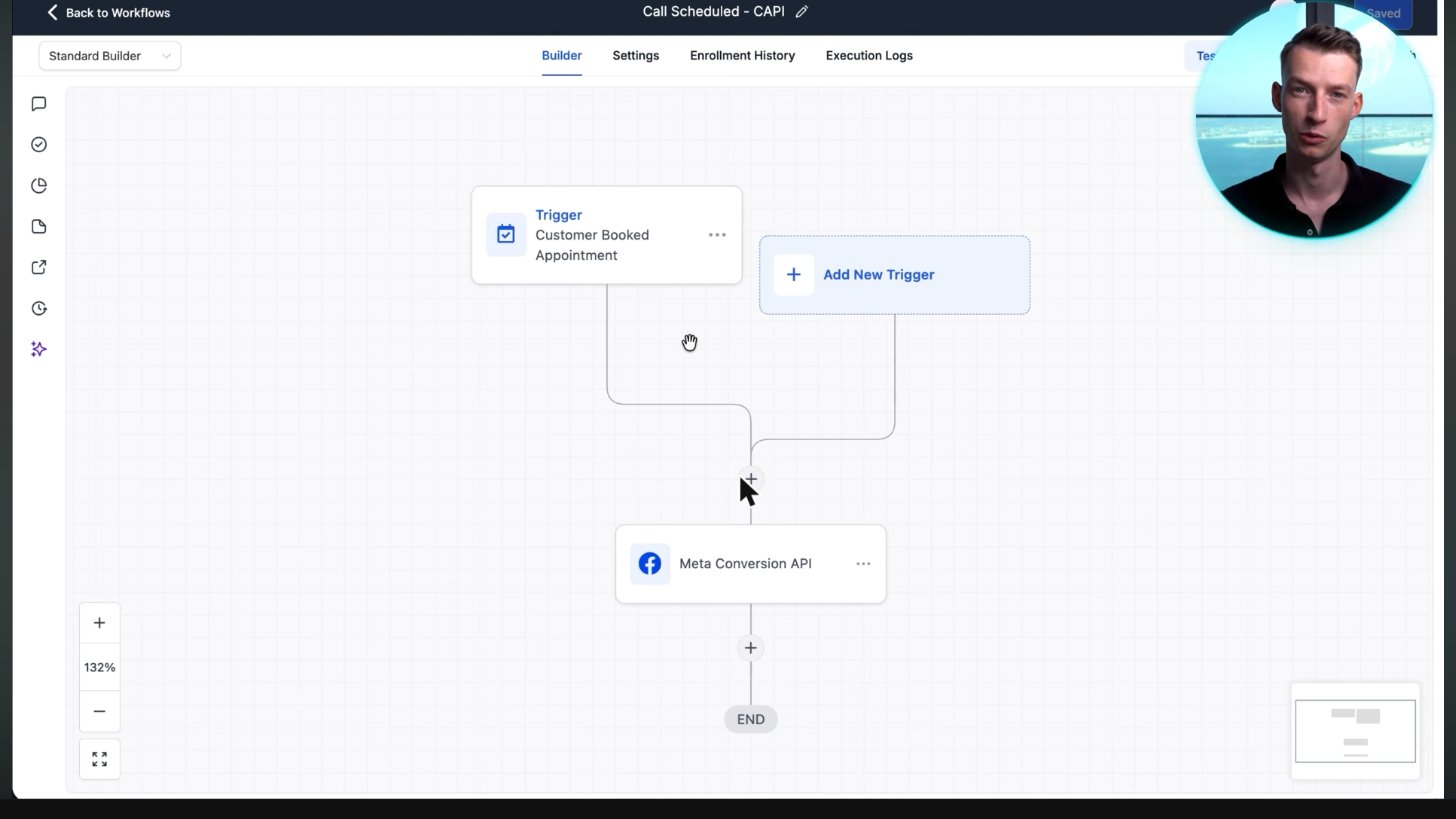
A real agency workflow: every booked call is sent to Meta's Conversion API so Facebook ads learn who books.
Screenshot from Vince Opra's GoHighLevel tutorial on YouTube.
Connect the correct Meta dataset, map the event and test it in Meta Events Manager. Check consent, privacy requirements and deduplication. Sending an event does not guarantee better ad performance.
Workflow recipes: start without building from scratch
Recipes shown in the supplied interface include:
- Email Drip Sequence
- Appointment Confirmation + Reminder
- Fast 5 Lite
- Long Term Nurture/Reactivation
- FAQ Auto Reply
Choose a recipe, replace its copy and links, set its trigger filters, and test with your own contact before publishing. Recipe names and availability can change with the interface.
Workflows vs Zapier and n8n
HighLevel workflows run inside the same platform as your CRM, calendars and inbox. Zapier and n8n are separate automation tools that connect many services. Built-in workflows are simpler for native lead follow-up; a separate tool can be useful for specialist integrations or data processing.
Official HighLevel tutorial
How To Optimize Your HighLevel Workflow with Go To Connections
An official workflow builder tutorial on Go To connections and workflow paths.
Official HighLevel videoPlaying shares data with YouTube. Vendor tutorial, not an independent review.
Frequently asked questions
Are workflows included in all plans?
Yes. Workflows are included in every HighLevel plan. Sending and certain premium actions can incur extra usage fees.
Is there a limit on workflows?
HighLevel does not advertise a workflow cap on its plans. Check current account and feature terms.
Can workflows send SMS?
Yes, when your sending setup is configured. SMS carrier fees apply; consent, opt-out and registration requirements still matter.
What is the difference between workflows and campaigns?
Campaigns are the older tool. HighLevel now builds automation in workflows, which combine triggers, actions and branching in a visual builder.
Can AI build a workflow for me?
Workflow AI in the builder can draft one from a prompt. Review triggers, filters and message content, then test before publishing.
Keep exploring GoHighLevel
Sources and editorial notes
Screenshots supplied by Adam, with individual source credits beneath each image. GHL Deals is an independent guide, not HighLevel. Interface labels, feature availability and usage fees can change; confirm current terms before enabling a paid feature.
Disclosure: We may earn a commission if you sign up through our links, at no additional cost to you. How we earn.