Integration guide
GoHighLevel Integrations: What Connects and How
By the GHL Deals editorial team · Last updated: October 2026
TL;DR
- The supplied HighLevel App Marketplace screenshot shows 1,631 apps, a snapshot of its 1,600+ app catalog at that time.
- Built-in connections include Stripe, PayPal, Google Calendar and Business Profile, Facebook, Instagram, WhatsApp and Meta Conversion API.
- Connect other systems through Make, Zapier, Pabbly or the API.
- Many Marketplace listings are free to install, but service subscriptions and usage charges may still apply.
- Install supported integrations from App Marketplace in your sub-account.
- Compare the 30-day trial and current deals.
Category | Examples |
|---|---|
Payments | Stripe, PayPal |
Calendars | Google Calendar, Outlook |
Social and messaging | Facebook, Instagram, WhatsApp |
Ads tracking | Meta Conversion API, Google Ads |
Automation | Make, Zapier, Pabbly |
Dialers | WAVV |
Availability, supported actions and billing depend on the connection. Marketplace app counts change; 1,631 is the number visible in the supplied screenshot, not a live count.
What is the GoHighLevel App Marketplace?
The GoHighLevel App Marketplace is a catalog of apps that extend HighLevel or connect it to other services. You can filter by category, pricing, installation permissions and white-label support, then inspect a developer’s listing before installing.
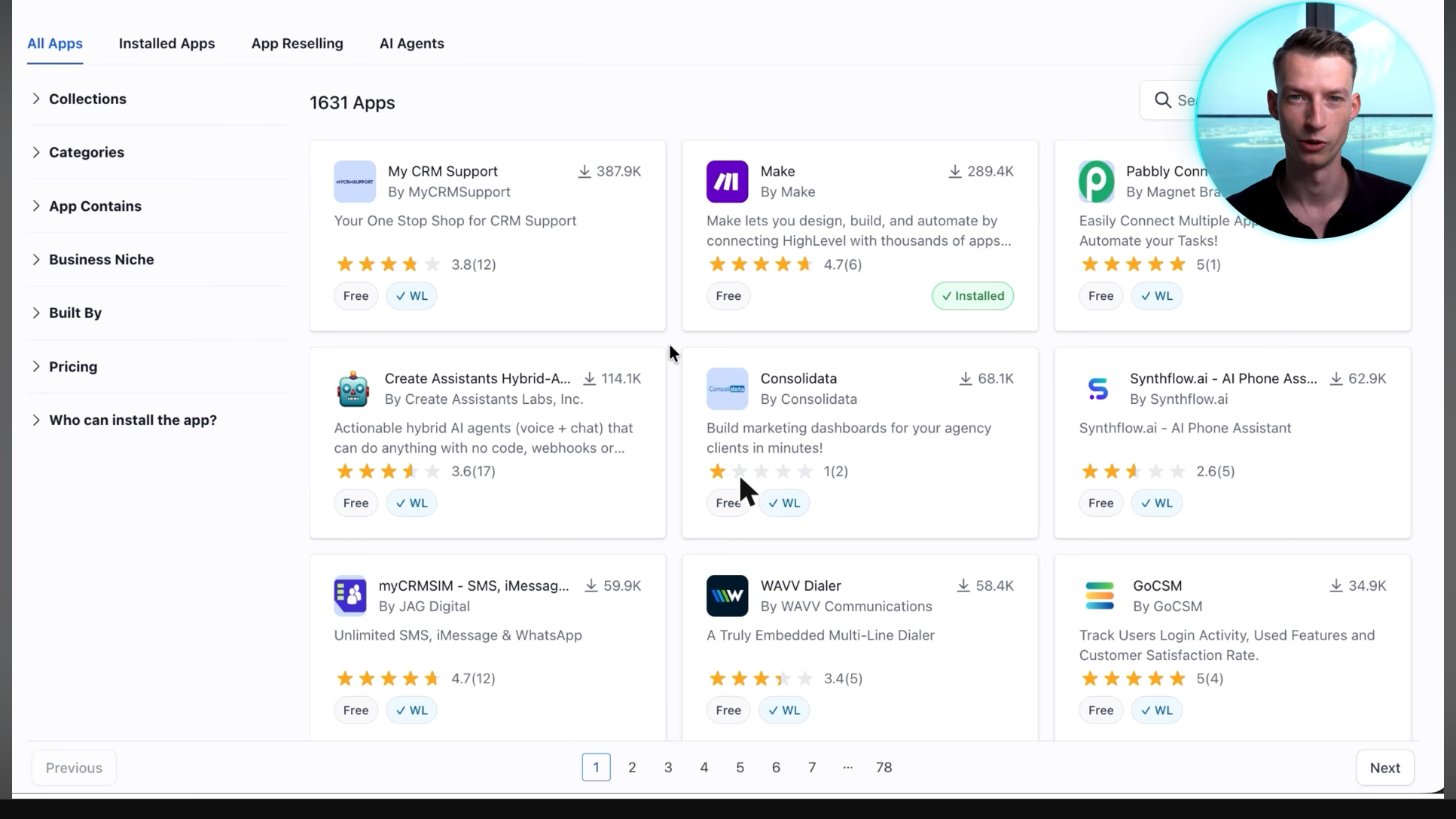
The App Marketplace inside HighLevel listed 1,631 apps, including Make, Pabbly and WAVV dialer. Many listings shown were labeled Free.
Screenshot from Vince Opra's GoHighLevel tutorial on YouTube.
The supplied screenshot shows 1,631 apps, including Make, Pabbly and WAVV. Many visible listings carry a Free label. That does not establish that most of the entire catalog is free, or that an external service has no subscription or usage charges.
Built-in integrations you don't need an app for
- Payments: connect supported Stripe and PayPal payment flows.
- Calendars: sync Google Calendar or Outlook with the appropriate account permissions.
- Social: connect Facebook and Instagram accounts for supported messaging and social functions.
- Local business: connect Google Business Profile for supported business and reputation features.
- Messaging: configure WhatsApp through HighLevel’s supported setup; fees and eligibility can apply.
- Ad tracking: configure Meta Conversion API and supported Google Ads connections.
Find native connections in the relevant settings area, such as Integrations, Payments or Calendars. Not every connection supports every feature of the external product. Check the specific setup article and test the action you need.
Connect anything with Make, Zapier or the API
For a service without a suitable native connection, check Make, Zapier or Pabbly for supported triggers and actions. These services can move data between tools without a custom app. If a required action is missing, use a supported webhook or an API request.
No connector literally supports every action in every product. Map fields carefully, choose a system of record, handle duplicate contacts and test both successful and failed runs. Check the automation service’s own plan and task limits.
How to install an integration (3 steps)
- Open App Marketplace in the correct sub-account. Search for the app and review its developer, permissions, pricing and support details.
- Select Install, authorize the required access and connect the external service account. Some apps need an agency admin or a paid external subscription.
- Configure the fields and workflow actions, then test with a test contact. Confirm the result in both systems before using live customer data.
Install only what you need. Review access periodically and revoke apps you no longer use. If an install button is missing, check the app’s account-level restrictions and your user permissions.
Integrations vs native features
HighLevel already includes appointment booking, email marketing and funnel building, so you may not need separate Calendly, Mailchimp or ClickFunnels subscriptions for basic versions of those tasks. A dedicated tool can still offer specialist features, familiar workflows or migration advantages.
Need | Native option | When a separate tool helps |
|---|---|---|
Appointment booking | HighLevel calendars | Specialist scheduling or an established team setup |
Email follow-up | Workflows and email marketing | Advanced email-only workflows or existing lists |
Funnels | HighLevel funnel builder | Specific design, commerce or course requirements |
Official HighLevel tutorial
How to Leverage GoHighLevel's Web Widgets Marketplace
An official tutorial on finding and using web widgets in the Marketplace, one category of HighLevel integrations.
Official HighLevel videoPlaying shares data with YouTube. Vendor tutorial, not an independent review.
Frequently asked questions
How many integrations does GoHighLevel have?
The supplied App Marketplace screenshot shows 1,631 apps. The count changes over time and is not a count of built-in connections alone.
Does GoHighLevel integrate with Zapier?
Yes. Zapier offers HighLevel/LeadConnector connections for supported triggers and actions. Check the connector and your Zapier plan for the action you need.
Does GoHighLevel work with Stripe?
Yes. Stripe is a native supported payment connection. Account eligibility, processor charges and individual payment features still apply.
Can I connect Google Calendar?
Yes. Connect your Google account and configure calendar sync and availability, then test bookings and conflict handling.
Are Marketplace apps free?
Many listings are free to install; others are paid by the developer. A free listing can still require a paid external service or incur usage charges.
Keep exploring GoHighLevel
Sources and editorial notes
Screenshots supplied by Adam, with individual source credits beneath each image. GHL Deals is an independent guide, not HighLevel. Interface labels, feature availability and usage fees can change; confirm current terms before enabling a paid feature.
Disclosure: We may earn a commission if you sign up through our links, at no additional cost to you. How we earn.