Mobile app guide
GoHighLevel App: The Mobile App for iPhone and Android
By the GHL Deals editorial team · Last updated: October 2026
TL;DR
- HighLevel and LeadConnector are free mobile downloads for iPhone and Android. You still need access to a HighLevel account.
- HighLevel shows the HighLevel brand; LeadConnector is the gray-label option often given to agency clients.
- Handle conversations, contacts, appointments, opportunities, invoices, review requests and calls from your phone.
- Tap to Pay on supported iPhones uses Stripe and requires an eligible payment setup.
- Set up workflows, pipeline structure, calendars and integrations on desktop first. A paid white-label app with your own branding is also available.
- Use the login guide if you can’t sign in.
App | Branding | Who it's for |
|---|---|---|
 HighLevel HighLevel | HighLevel brand | You and your team |
LeadConnector | Neutral / gray label | Your clients, without the HighLevel app name |
White-label app | Your brand | Agencies that want their own app (paid) |
Free download does not mean a free HighLevel account. Processor, calling and messaging charges still apply. LeadConnector has its own neutral brand; it is not the same as a fully custom-branded app.
Which GoHighLevel app should you download?
Use the HighLevel app for a HighLevel-branded experience, or LeadConnector if your agency directs you to the gray-label app. Both are available for iPhone and Android. A white-label app is a separately paid service for agencies that want their own app name and branding.
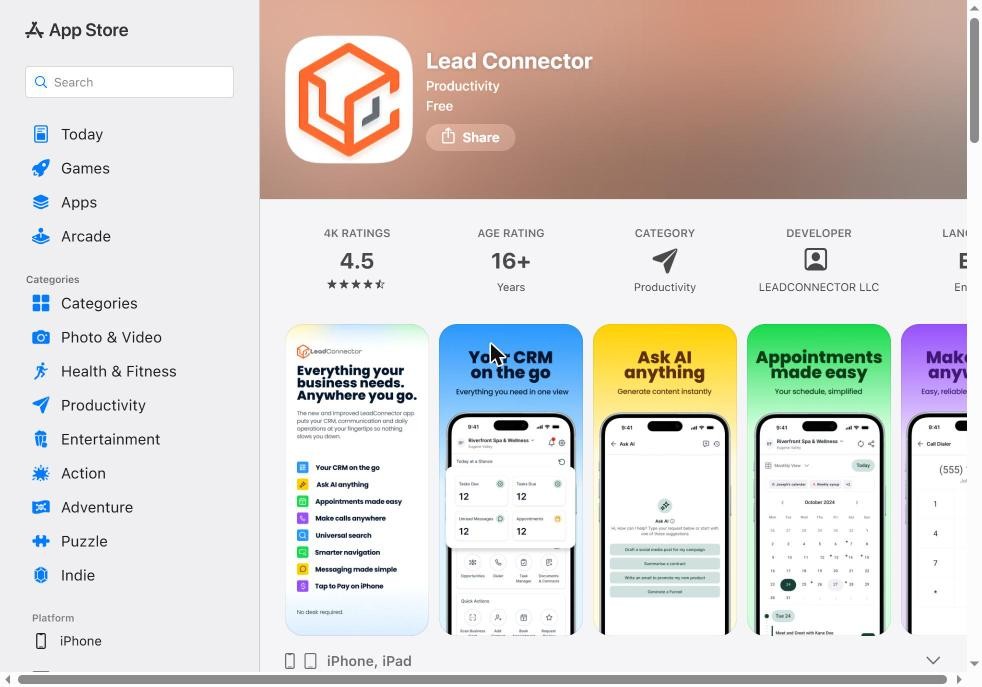
The LeadConnector app on the App Store: free, rated 4.5 from about 4K ratings in the supplied screenshot.
Screenshot taken by GHL Deals.
The 4.5 rating and about 4K ratings belong to the supplied App Store screenshot, not a live rating. Store ratings, features and regional availability change. Check the developer and follow official store links rather than downloading an installer from an unknown site.
What you can do in the app
- Conversations: reply through supported SMS, email, Facebook, Instagram and WhatsApp connections.
- Contacts: find a record, add notes and update supported details.
- Appointments: view bookings and manage supported scheduling tasks.
- Opportunities: work existing pipelines and update deal stages.
- Payments: manage supported invoices and use Tap to Pay where eligible.
- Reputation and calling: send review requests, make calls and use available quick actions.
These tools depend on your role, connected channels, account configuration and app version. Carrier and WhatsApp charges are separate from the app download. Calling also requires a configured phone service.
Tap to Pay on iPhone uses Stripe with supported devices, countries and account eligibility. Set up your payment connection first and check current regional requirements. The processor’s transaction fees still apply.
What still needs the desktop
Use desktop for the full account setup: build workflows, configure pipeline structure and calendars, create custom fields and connect integrations. Mobile is primarily for working the system after it has been configured, not a replacement for every builder or settings screen.
Task | Mobile | Desktop |
|---|---|---|
Conversations and contact follow-up | Day-to-day replies and updates | Full configuration and management |
Opportunities | Work existing deals and stages | Build pipeline structure |
Appointments | View and manage supported bookings | Configure calendar rules and connections |
Workflows | Use the configured automation | Build, test and publish workflows |
Integrations and custom fields | Use configured connections and fields | Set up and administer |
Mobile capabilities evolve. Check the current official guide if a feature appears in your app, but use desktop for a reliable full setup and testing path.
How to log in to the app
- Download the official HighLevel, LeadConnector or agency-provided white-label app.
- Sign in using your existing account email and password, and complete verification if requested.
- Use the account selector to switch among the sub-accounts your user can access. If a location is missing, ask your agency admin to check permissions.
The mobile app does not grant access to accounts you have not been invited to. If a password reset or security code fails, use the login troubleshooting guide. Agency clients should contact their agency for access help.
Official HighLevel tutorial
Mobile PoS Support for BBPOS WisePOS E and Stripe S700 Internet Readers on Mobile POS
An official mobile app payment tutorial showing supported Stripe internet readers in Mobile POS.
Official HighLevel videoPlaying shares data with YouTube. Vendor tutorial, not an independent review.
Frequently asked questions
Is the GoHighLevel app free?
Yes. HighLevel and LeadConnector are free mobile downloads, but you need an existing HighLevel account or agency invitation. Account subscriptions and usage charges are separate.
What is the LeadConnector app?
LeadConnector is HighLevel’s gray-label mobile app. It does not use the HighLevel app name, making it useful for agency clients, but it still has its own LeadConnector branding.
Can I build workflows on my phone?
Use the desktop workflow builder for creating, testing and publishing workflows. The mobile app is not the full desktop builder.
Can I take payments on my phone?
Yes. Supported mobile payment features include Tap to Pay with Stripe on eligible devices and in supported countries. Configure the payment account first; processor fees apply.
Can I get my own branded app?
Yes. HighLevel offers a paid white-label mobile app service for agencies that want their own app branding. Check current pricing and setup requirements.
Keep exploring GoHighLevel
Sources and editorial notes
- HighLevel mobile app help article (may require sign-in)
- LeadConnector official Apple App Store listing
- HighLevel: consolidated mobile payment hub
- HighLevel: supported mobile conversation channels
Screenshots supplied by Adam, with individual source credits beneath each image. GHL Deals is an independent guide, not HighLevel. Interface labels, feature availability and usage fees can change; confirm current terms before enabling a paid feature.
Disclosure: We may earn a commission if you sign up through our links, at no additional cost to you. How we earn.