Dashboard guide
GoHighLevel Dashboard: A Tour of a Real Account
By the GHL Deals editorial team · Last updated: October 2026
TL;DR
- The dashboard is the home screen for each sub-account, with widgets for opportunity value, pipeline stages, conversion and other activity.
- Email reporting has its own marketing statistics view; task and payments reporting depend on configured data and widgets.
- With the right permissions, add, remove, resize and switch between custom dashboards.
- Agency-level views cover agency business and account activity; do not assume every sub-account widget is automatically combined.
- New accounts can start with the Launchpad and fill reports as data arrives.
- Compare the 30-day trial and current deals.
Metric | Meaning | Not the same as |
|---|---|---|
Open opportunity value | Value assigned to open pipeline deals | Cash collected |
Won opportunity value | Value of deals marked won | A reconciled payments total |
Conversion | Configured status or funnel conversion | A guarantee of sales |
Email statistics | Delivery, opens and clicks in Marketing | Verified results when sample data is shown |
Filters, dates, status definitions and data quality change the meaning of every widget. Tutorial screenshots are not an audited revenue statement.
What the GoHighLevel dashboard shows
The sub-account dashboard summarizes records in that account, such as opportunity status, opportunity value, funnel progression and stage distribution. What appears depends on your dashboard configuration, permissions and data; use the date range and pipeline filters to read the right period.
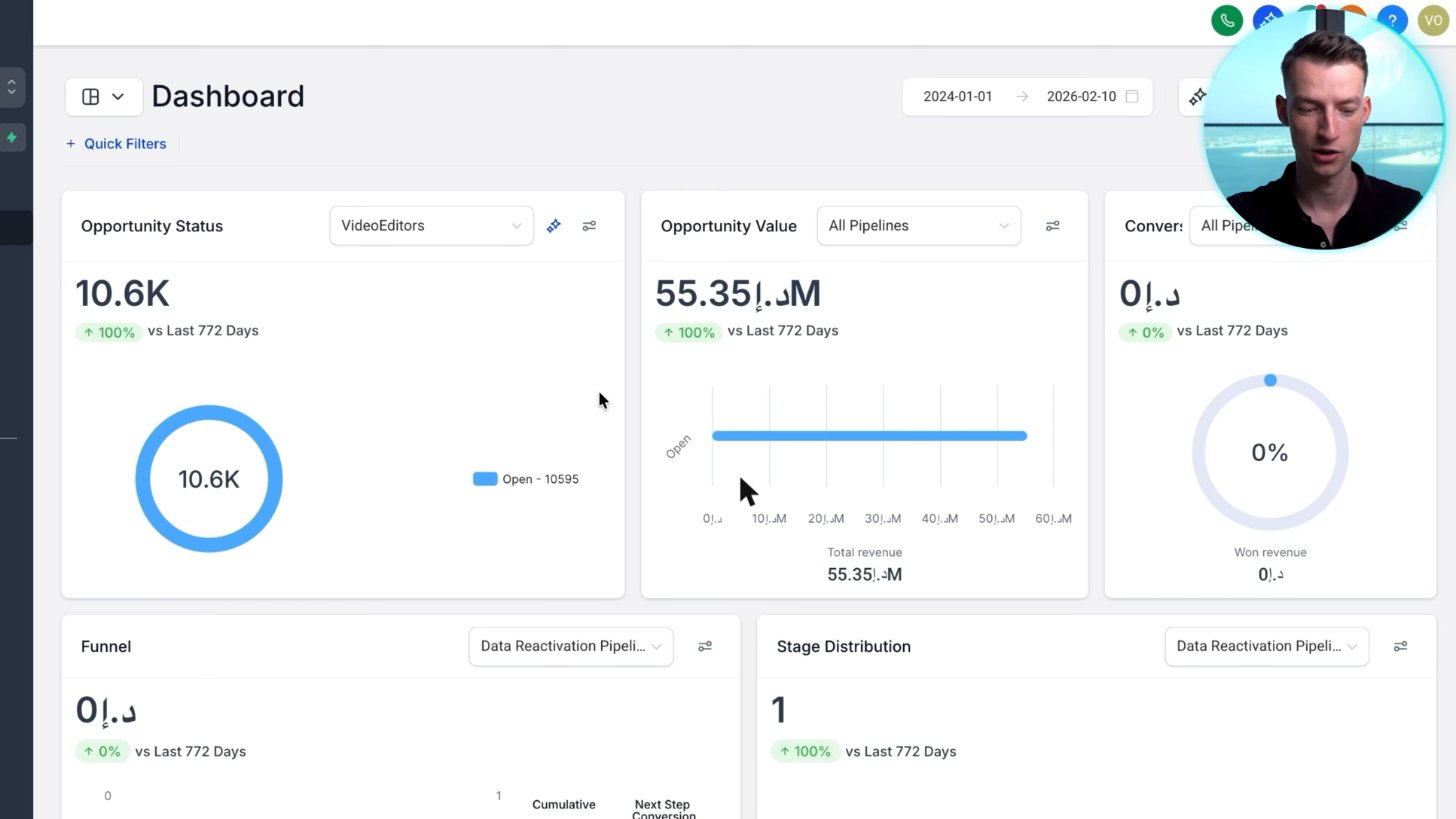
A real agency dashboard: pipeline value, opportunities by stage and conversion in one view. The large figure is open pipeline value, not money already earned.
Screenshot from Vince Opra's GoHighLevel tutorial on YouTube.
Read a real dashboard
The supplied agency account shows many open opportunities and a large opportunity-value figure. That number is the value assigned to pipeline deals, not money already earned, and its units are partly obscured in the screenshot.
Won value comes from deals marked won, while collected revenue requires the relevant payments data. Check the underlying opportunities and payment records before using a dashboard number in a financial report.
Email and marketing stats
Open Marketing > Emails > Statistics to inspect delivery, opens and clicks for the selected campaigns and dates. This screenshot shows a sample-data banner, so the visible 47% opened and 11% clicked are demonstration figures, not verified account results.
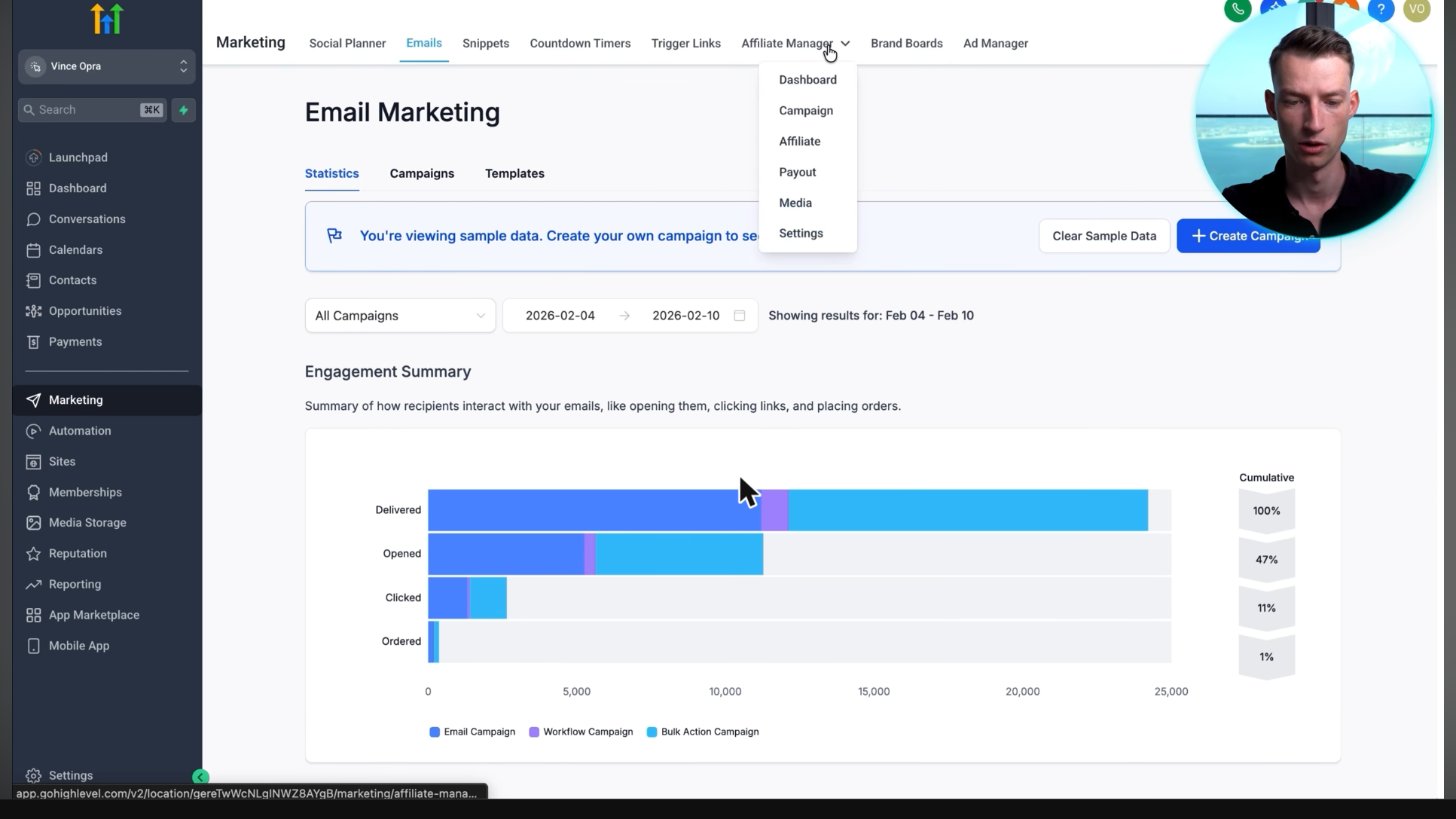
The email statistics screen shows about 24,000 delivered, 47% opened and 11% clicked. Its banner explicitly labels these as sample data, not verified campaign results.
Screenshot from Vince Opra's GoHighLevel tutorial on YouTube.
Opens can be affected by privacy protections and automated activity. Track meaningful clicks, replies and bookings alongside delivery rather than treating open rate alone as success.
How to customize the dashboard (add widgets, date range, filters)
With dashboard editing permission, enter edit mode and add the widget you need, then move, resize or remove widgets and save the dashboard. Choose the widget metric and filters, set an appropriate date range and confirm the totals against a known record.
- Open the correct sub-account dashboard and choose edit mode.
- Add a widget and configure its metric, chart and filters.
- Arrange or resize the widgets, then save.
- Set the reporting date range and test the result against underlying records.
You can create and switch between custom dashboards. HighLevel’s current help article includes multiple dashboards and custom reports on all three plans ($97, $297 and $497); editing and sharing still depend on permissions.
Agency dashboard vs sub-account dashboard
Sub-account users see reporting for their own location, subject to their role. Agency-level dashboards and reports serve agency operations, subscription activity and supported cross-account reporting; the agency view is not simply every location dashboard pasted together.
Dashboard for new accounts: the Launchpad
An empty dashboard usually means the account has little data or the selected filters exclude it. Use the Launchpad, add contacts, create a pipeline and test a booking before expecting populated widgets.
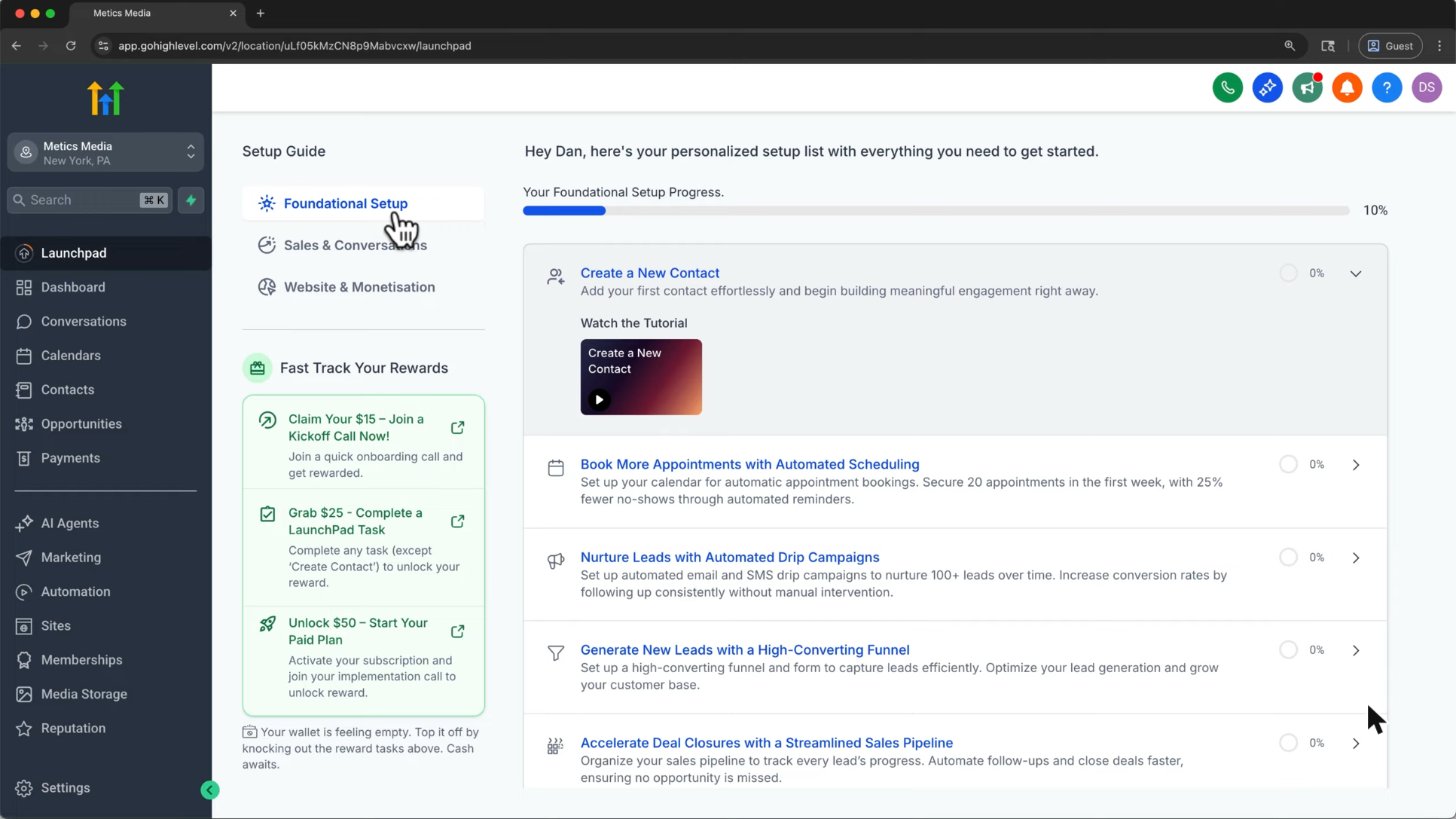
Brand new accounts can use the Launchpad to finish setup, then the dashboard fills up as you add data.
Screenshot from Metics Media's GoHighLevel tutorial on YouTube.
Official HighLevel tutorial
How to Create Custom Dashboard Widgets
An official tutorial for adding and configuring custom dashboard widgets.
Official HighLevel videoPlaying shares data with YouTube. Vendor tutorial, not an independent review.
Frequently asked questions
How do I edit the GoHighLevel dashboard?
Open the dashboard in the correct sub-account and use edit mode to add, configure, remove or resize widgets, then save. You need the appropriate dashboard permissions; some reporting features depend on your plan.
Can I make more than one dashboard?
You can create and switch between custom dashboards. HighLevel currently includes multiple dashboards and custom reports on all three plans. Editing and sharing depend on your permissions; check the official guide for setup.
Does the dashboard show revenue?
It can show opportunity value and won value from pipelines, plus supported payments data when configured. Open pipeline value is not earned revenue, and won opportunity value is not necessarily cash collected.
Can clients see the dashboard?
Yes. Sub-account users can see their own permitted dashboards, not unrestricted reporting for other clients or the whole agency.
Why is my dashboard empty?
There may be no data yet, an unsuitable date range or filters, or missing permissions. Add contacts and a pipeline, test an opportunity and check the widget configuration.
Keep exploring GoHighLevel
Sources and editorial notes
- HighLevel: create a custom dashboard, widgets and plan availability
- HighLevel help center: current setup instructions
- Official HighLevel pricing and plan features
Screenshots supplied by Adam, with individual source credits beneath each image. GHL Deals is an independent guide, not HighLevel. Interface labels, feature availability and usage fees can change; confirm current terms before enabling a paid feature.
Disclosure: We may earn a commission if you sign up through our links, at no additional cost to you. How we earn.