Campaign walkthrough
GoHighLevel Database Reactivation: A Real Campaign, Step by Step
By the GHL Deals editorial team · Last updated: October 2026
TL;DR
- Database reactivation means re-contacting old leads you already paid for, where you have valid consent.
- This campaign shows 147 leads, three automated messages and 17 appointments booked, about 11.6%.
- Sending costs are mostly SMS and email usage, alongside your base plan and any setup or AI costs.
- It can work across businesses with an old, consented lead list and a relevant offer.
- GHL runs it with one workflow and one pipeline; results vary.
- Understand the workflow behind the campaign.
Metric | Count |
|---|---|
Old leads | 147 |
Reached wait step | 121 |
Moved to second text | 13 |
Appointments booked | 17 |
Hand-typed messages | 0 (automated sends, as described by the creator) |
The video title says 20 appointments, but the pipeline on screen shows 17 at recording time, so we use 17. These are creator-reported counts from supplied footage, not independently audited results or a guarantee. Booked appointments are not the same as attended calls or sales.
What is database reactivation?
Database reactivation means reaching out to older leads who already know your business but did not buy or book. Instead of purchasing another cold audience, you ask whether their original goal is still relevant. HighLevel can send the messages, wait for replies and track interested leads in a pipeline.
The exact workflow, step by step
1. Load the eligible lead list
The supplied Repair Reactivation pipeline shows 147 old credit repair leads. Import or select only contacts with valid consent, remove opt-outs and invalid numbers, then add a campaign tag and create the opportunities.
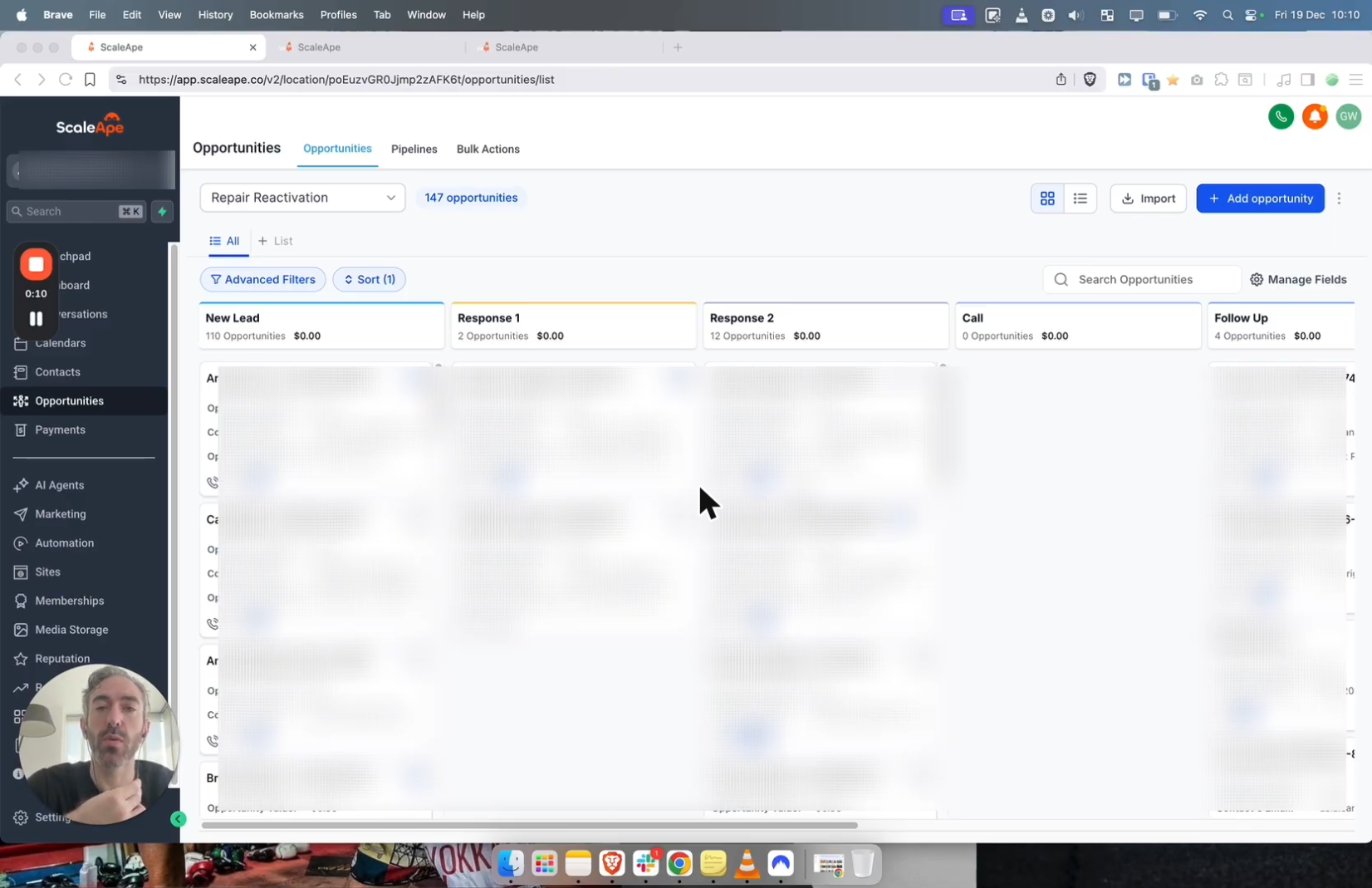
Start: 147 cold credit repair leads loaded into a Repair Reactivation pipeline.
Screenshots from Gavin Wiener's YouTube video '20 credit repair appointments in 1 week'.
2. Send the first SMS
Is this {first name}? Just want to make sure I have the right number.
The builder uses {{contact.first_name}} to personalize the message. Identify your business and include an opt-out in your own compliant version. The screenshot then shows a five-minute wait before the email.
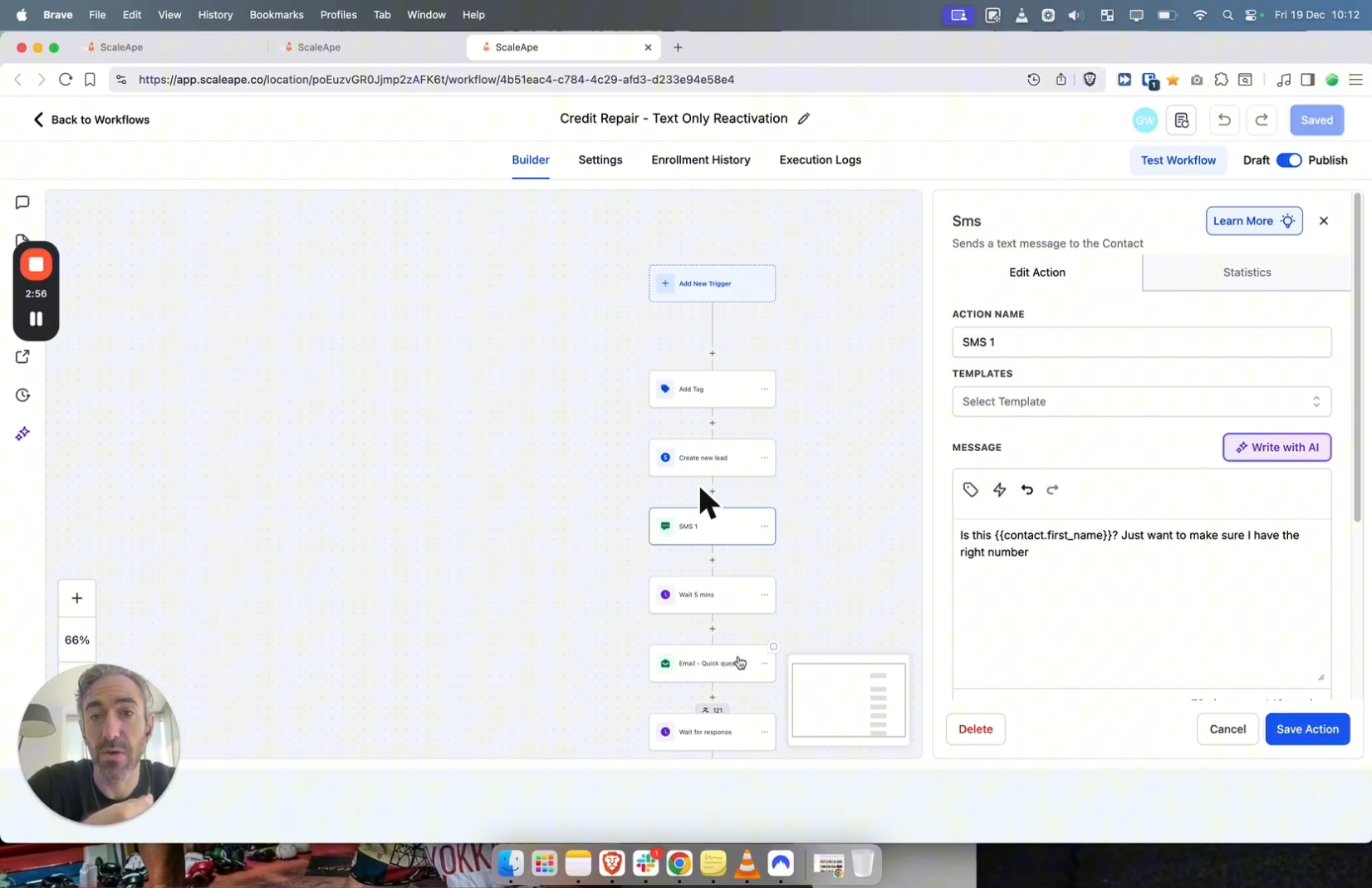
Text 1, sent automatically: 'Is this {first name}? Just want to make sure I have the right number.'
Screenshots from Gavin Wiener's YouTube video '20 credit repair appointments in 1 week'.
3. Send the email
Hi {first name}, Are you still looking to improve your credit, or is it no longer a priority? -Lamarr
That is the creator's credit repair example. Replace the goal and signature with your own real offer and sender, and use the appropriate unsubscribe and business details.
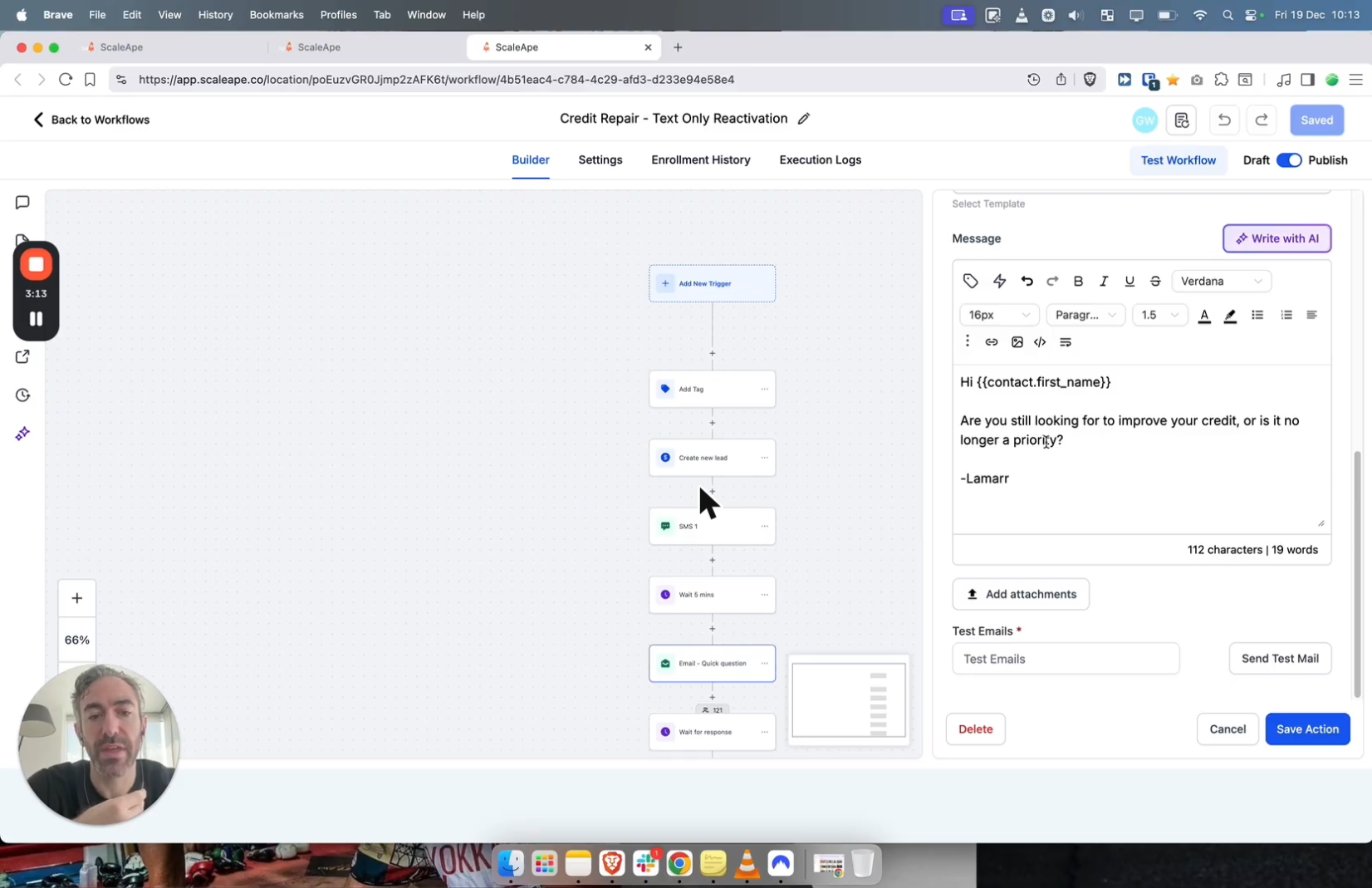
Then an email: 'Are you still looking to improve your credit, or is it no longer a priority?'
Screenshots from Gavin Wiener's YouTube video '20 credit repair appointments in 1 week'.
4. Wait for a reply, then send the second SMS
Ah okay, are you still looking to improve your credit?
The workflow waits for a response, moves the contact to Response 1, waits one minute, sends SMS 2, then waits again before moving to Response 2. The supplied counters show 121 at the wait step and 13 moving on to the second text; do not interpret those counters as a complete conversion funnel.
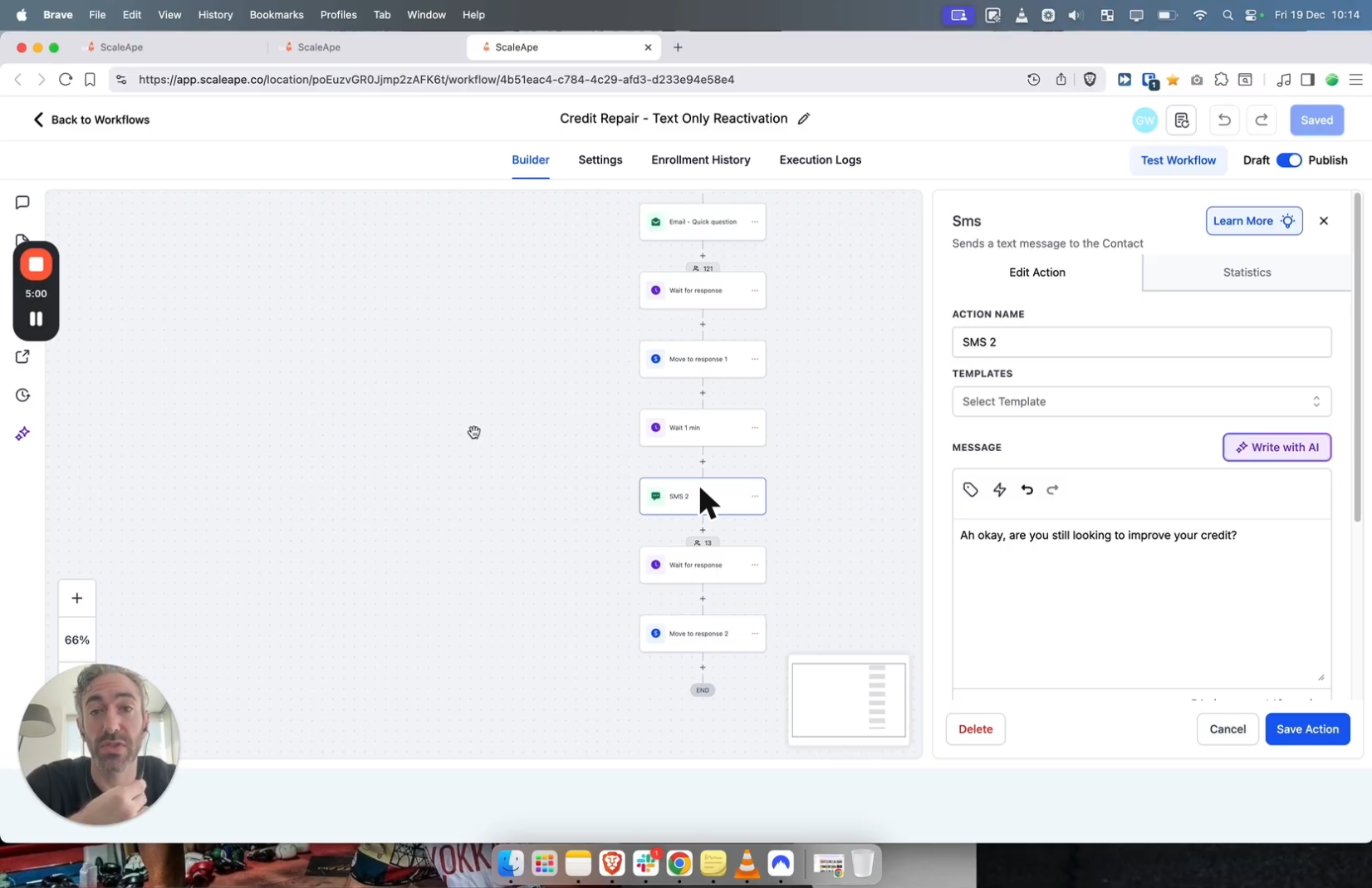
The workflow waits for a reply. Counters show 121 contacts reached this step and 13 moved on to the second text.
Screenshots from Gavin Wiener's YouTube video '20 credit repair appointments in 1 week'.
5. Track booked appointments
The pipeline shows 17 opportunities in Appointment Booked. Automated message sends are not proof that every reply, qualification or booking happened without a person. Track replies, attended calls and sales separately.
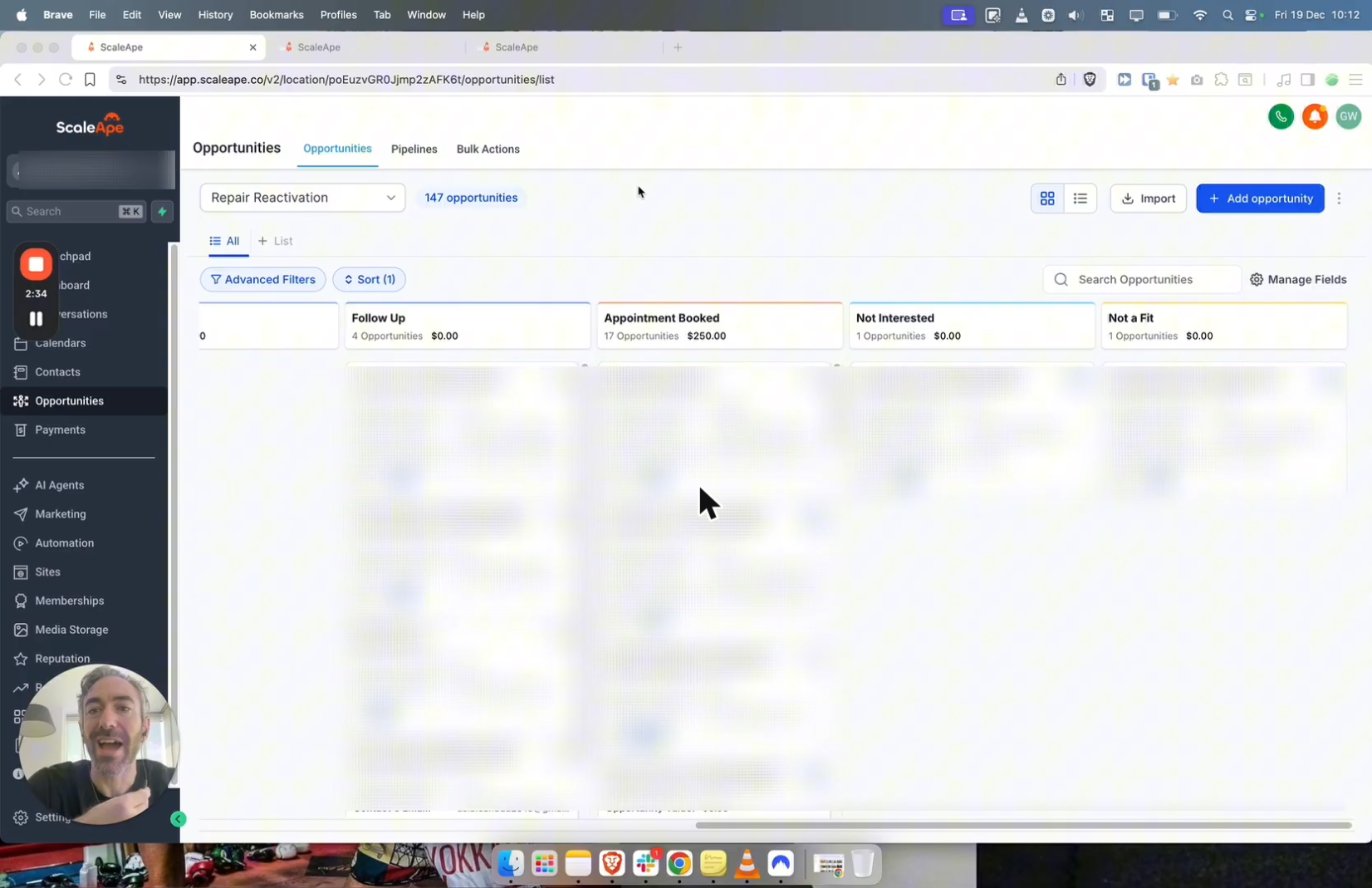
Result: 17 appointments booked from 147 old leads. Nobody typed a message by hand.
Screenshots from Gavin Wiener's YouTube video '20 credit repair appointments in 1 week'.
Copy these reactivation messages
These short templates preserve the campaign's conversation structure. They are starting points, not ready-to-send legal wording: add your business identity and opt-out, and confirm consent.
Text 1: confirm the contact
Is this {first name}? Just want to make sure I have the right number.
Email: check the goal
Are you still looking to [goal], or is it no longer a priority?
Text 2: follow up after a reply
Ah okay, are you still looking to [goal]?
Rules to follow
- Only text people who opted in to the relevant type of marketing. A stored number, old enquiry or new verification question does not establish consent.
- Identify your business, include a clear opt-out and honor it immediately across every sequence.
- Complete applicable A2P 10DLC registration for US local-number business messaging. Registration does not replace consent.
- Send during permitted business hours in the recipient's time zone. Configure sending windows and stop on opt-out.
- Follow TCPA and applicable state and local rules, as well as email marketing requirements. Ask qualified counsel where needed.
An older list may contain reassigned numbers or expired permissions. Check consent validity and suppression lists before enrollment. Avoid sensitive financial details in messages.
How to sell database reactivation to clients
Agencies can charge a setup fee or agree a fee per qualified booked appointment. Define what counts as qualified, how duplicates and no-shows are handled, and who owns reply handling. Do not promise the same 17 bookings or any guaranteed return.
Agree the list selection, consent responsibilities, messaging costs and reporting before launch. A small pilot lets you measure reply quality, opt-outs, attended calls and actual sales.
Independent campaign walkthrough
20 credit repair appointments in 1 week - gohighlevel reactivation
Watch the full campaign walkthrough.
Independent video by Gavin WienerPlaying shares data with YouTube. Creator-reported case, not independently audited by GHL Deals.
Frequently asked questions
What is a good reactivation response rate?
It varies by list age, consent, offer and follow-up. This campaign booked about 12% of its 147 leads, which is a booking rate, not a measured reply rate or a benchmark.
Do I need the Unlimited plan?
No. Workflows and pipelines are in every plan; sending and premium actions can add usage charges.
Can I use AI for replies?
Yes. Conversation AI can handle suitable replies when trained and configured, with human handoff rules. It is a separately billed add-on.
How old can the leads be?
There is no universal age cutoff, but older lists tend to reply less. Only use contacts whose consent remains valid, and check for opt-outs and reassigned numbers.
Is it legal?
Only contact people who gave the required consent and follow TCPA, state and local rules, opt-out requirements and channel policies. A screenshot or workflow template is not legal clearance.
Keep exploring GoHighLevel
Sources and editorial notes
Screenshots supplied by Adam, with individual source credits beneath each image. GHL Deals is an independent guide, not HighLevel. Interface labels, feature availability and usage fees can change; confirm current terms before enabling a paid feature.
Disclosure: We may earn a commission if you sign up through our links, at no additional cost to you. How we earn.